









Dynamic Notch Notification Bar is a handy Android customization app that brings a stylish, interactive notch to the top of your screen. It lets you view notifications, check phone status, and access recent alerts through a compact pop-up without leaving your current application. Tap the dynamic notch to expand supported notifications, check additional details, and access quick actions when available.
CONVENIENT FEATURES
Dynamic Notch Notification Bar makes everyday phone interactions more convenient by bringing important alerts and useful information into one accessible area. Its dynamic display can adapt to different activities, helping you stay informed while using other apps.
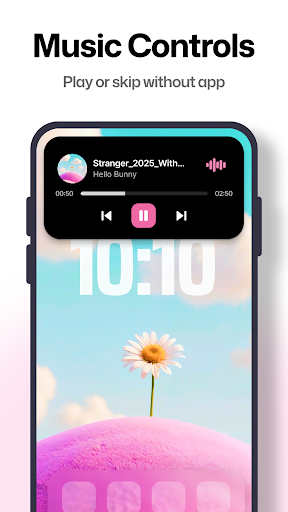
- Music Information: View details about the currently playing song directly in the notch area. Depending on the supported music player, you may see track information, album artwork, and convenient playback controls.
- Smart Notification Display: Access supported alerts from different apps, including messages, calls, alarms, work emails, and other notifications. You can also view relevant phone status information, such as screen recording and charging activity, when supported.
- Navigation Information: View supported navigation alerts in the notch area while following directions. This can help you check important route updates without switching away from the app you are using.
- Charging Animation: Enjoy a visual charging indicator when your phone is connected to a power source. The animated display makes it easier to recognize charging status at a glance.
- Weather Information: Access weather details through the notch interface when the feature is available. Some versions may also offer weather-based themes that change the appearance according to current conditions.
CUSTOMIZABLE INTERFACE
Personalize the dynamic notch to match your smartphone’s appearance and your preferred notification style. The app provides customization options that help you adjust the visual presentation of alerts and create an interface that feels more personal.
- Adjustable Text and Appearance: Customize supported font styles, text sizes, colors, and backgrounds to make notification content easier to read. Experiment with different combinations to create a look that suits your preferences.
- App-Specific Colors: Set different font or background colors for individual applications when supported. These visual differences can help you recognize the source of an alert more quickly without opening the notification.
With its interactive notch, notification previews, phone status indicators, and customizable appearance, Dynamic Notch Notification Bar offers another way to personalize your Android experience. Available features and quick actions may vary depending on your Android version, device settings, app permissions, and the applications you use.


Comments (0)
No comments yet. Be the first!